Voice Mode · with sound
It runs the talk while you present
“Start recording”, “Snazzy, next slide”, a question answered out loud with the mic muted, then “Snazzy, stop recording”. Talk to the audience is ignored.
Snazzy Pro is a presentation studio with an AI agent built in. Talk to it, or let it run the show: it plans your talk, builds the slides, changes them as you speak, starts and stops the recording and runs your live class. It asks you first before anything goes public.
macOS 15 or later · Apple Silicon and Intel · 6 MB · Signed and notarized by Apple · Coming soon to the Mac App Store
Windows 10 or 11 and Ubuntu 24.04 or later: an early beta with the chat assistant, decks, the slide editor and presenting. Recording and the live room follow.
All downloads and install steps · By downloading you agree to the Terms of Use and Privacy Policy.
How it works
One conversation takes you from an idea to a finished video or a live class. Every step also has buttons, if you prefer clicking.
Say what you need, by typing or out loud. The assistant asks a couple of questions, then plans the outline and writes your script.
Make it five minutes, for the leadership team.
Watch the slides, or a clickable app prototype, being written live. The assistant checks its own work and fixes errors before you see them.
Add a chart of the pipeline. Darker theme.
Present the deck with your speaker notes in front of you, your camera in the corner and your mic, all in one take. Each slide becomes a chapter.
Put my iPad camera bottom-right and record this deck.
Open a live room your class joins from a QR code, with a brainstorm board, or stream to YouTube, Twitch or Vimeo.
Start a live room for brainstorming the school fair.
The AI agent
The assistant isn't a chat window bolted on: it drives the same controls you do. Ask it in the chat, or switch on Voice Mode and talk hands-free while you present. It works alongside you, so you can click any button yourself at any time.
Slides, recording (start, pause, stop), the camera prompter, presets and settings. It knows which slide you're on and what your notes say.
Snazzy, next slide.
Opens the live room, welcomes students, seeds the brainstorm board, closes voting and turns the top ideas into a deck. It can also start and stop a stream.
Tell the class that voting is closed.
Talk, and it answers out loud with your Mac's built-in voices. Your mic is muted while it speaks, so its voice never ends up in your recording. While you're recording or live, it only listens when you say “Snazzy” first.
Snazzy, what's the key point of this slide?
Going live, streaming and anything that can't be undone wait for your OK on screen. Every step it takes is shown in the chat, and the simple commands work even with no AI set up.
Start a live room for my class.
Voice Mode · with sound
“Start recording”, “Snazzy, next slide”, a question answered out loud with the mic muted, then “Snazzy, stop recording”. Talk to the audience is ignored.
Agent · Live room
Opens the room (after you approve it), welcomes the class, adds ideas, closes voting and builds a deck from what students chose.
See it working
No mock-ups: these are the Mac app, the iPhone and iPad remote and a student's browser, doing the real thing.
Mac · AI on your Mac
Type (or say) what you need. The assistant plans the slides, writes them with speaker notes, checks its own work and shows you the result. Here with a local model on the Mac: nothing leaves it.
Mac · Live room
Start a room, students join from a QR code and post ideas. Votes come in, you send a message to everyone, and the assistant turns the ideas into a deck.
Mac · Snazzy Interview · with sound
The candidate reads what the AI does and doesn't do, then each question is spoken aloud while the role's deck moves on to it. Short, neutral follow-ups ask for specifics. Here a simulated candidate answers, with a local model on the Mac.
Mac · Snazzy Interview
Approve a role's questions and rubric, watch the interview arrive, then read the evidence: the candidate's own words for each skill, checked against the transcript, with the AI's suggestion marked as a suggestion. You choose Advance, Hold or Decline.
Builder
Ask for a deck or a working prototype. Code appears as the assistant writes it, the preview updates on every save, and console errors go straight back to the assistant so it can fix them.
Present
The Builder makes the deck; the Slides tab presents it. Record This Deck captures the slides straight from their own window, so no menu bar, notifications or other windows ever appear in your video.
Camera Prompter
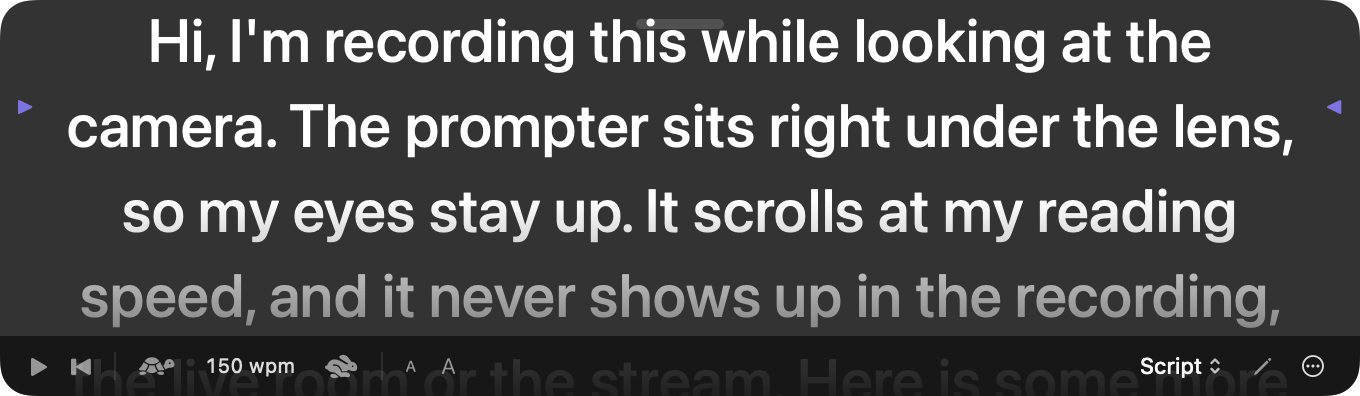
A teleprompter that sits right under your Mac's camera, so your eyes stay on the viewer while you read. It scrolls at your speaking speed, starts when you hit Record, and never appears in the recording, the live room or the stream.
Camera
Use your Mac's camera, a USB webcam, Continuity Camera, or the iPad or iPhone on your desk, connected by cable. Drag and pinch the live preview to frame yourself. Previews never appear in the recording.
Recording
Screen, camera and microphone are captured in one place, on one clock, so they stay in step. Pause and resume freely. If a camera freezes or gets unplugged, the recording carries on and the freeze is marked.
Voice and AI
Press the mic and speak. It's transcribed on your Mac. Pick the AI per task, and save complete setups as presets you can switch between in a sentence.
Live classroom
Start a live room and your class scans a QR code. They watch your slides and camera and hear you in their browser, then add ideas to a shared board and vote. It goes straight from your Mac over your Wi-Fi: no Zoom, no accounts, no servers.
Go live online
For a big public audience, stream your slides, camera and voice to YouTube: free, searchable, and it keeps the replay. Business audience? Add LinkedIn Live. Twitch, Vimeo, Facebook and your own RTMP server work too.
| Audience | Best place | Why |
|---|---|---|
| The public: learners, customers, developers | YouTube Live | Free, huge reach, found in search later, keeps the replay |
| Business buyers, IT and security teams | LinkedIn Live | Where enterprise buyers already are |
| Developer community, casual streams | Twitch or X | Smaller, niche audiences |
| A class or team in the same building | Snazzy Pro live room | QR code, any browser, nothing leaves your Wi-Fi |
| Private company talks | Not YouTube | “Unlisted” isn't private. Use a live room or your company's own server |
Read the guide: Where to go live · How to go live on YouTube
iPhone & iPad
Pair your iPhone or iPad by scanning a code on your Mac. Then start and stop recording, change slides and read your speaker notes from across the room, or ask the assistant for something. The link is encrypted, and only devices you pair can connect.
Apple Watch
The Snazzy Pro watch app comes with the iPhone app. Start, pause and stop recording on your Mac, go to the next or previous slide, and see the recording time at a glance. Your watch taps your wrist when recording starts and stops, so you can keep your eyes on your audience.
Read more: The Apple Watch remote
Share
Share a deck or prototype, with presets and backgrounds if you like, as one .snazzy file by AirDrop, Messages or Mail. They double-click it and it opens in their Builder. API keys, conversations and recordings are never included.
Coming soon
Recruitment and HR · in testing
Snazzy Interview runs structured first-round interviews for recruiters and HR teams. Every candidate gets the same questions in the same order, the AI asks short follow-ups for specifics, and the hiring team gets the evidence in the candidate's own words. A person makes every decision.
Auto Interview: the role's deck on screen, each question spoken aloud, answers heard on the Mac. With a local model (Ollama or Apple's on-device model) nothing leaves the Mac, and results are saved as a file you keep.
Tell me about a time traffic through a CDN went wrong in production.
Send a candidate a link they open in any browser on your network today. Hosted links for candidates anywhere, with results going straight into interview management, are coming with OpsAPI.
Your answers go to a person, who decides.
No analysis of faces, voices or emotions. The camera is the candidate's choice and can be turned off at any time. Personal details they mention are hidden from the assessment, and they can ask for a person instead.
I'd prefer to speak to a person.
For each skill the role needs: the candidate's own words, checked against the transcript, with the AI's suggestion marked as a suggestion. You choose Advance, Hold or Decline, and fairness reports show how decisions fall across groups.
Advance · Hold · Decline
Candidates: free interview prep kits with study topics, hands-on exercises and practice interviews with coaching.
Watch the interview tours · How Snazzy Interview works · Interviewing engineers: four sample roles
One app for every kind of explaining
Teachers, sales teams, nurses, recruiters, finance leads and shift managers all record the same way: say what you need, check the slides, press Record. Snazzy Pro includes a sample deck for each of these jobs, so you can start from one and make it yours.
| Who it's for | Sample deck included | Slides | Screen | Camera inset | iPhone / iPad camera | Backgrounds | Captions | Share link |
|---|---|---|---|---|---|---|---|---|
| EducationTeachers and tutors | A five-minute lesson | ✓ | · | ✓ | · | · | ✓ | · |
| SalesSales and account teams | A personal demo for one prospect | ✓ | ✓ | ✓ | · | ✓ | · | · |
| HealthcareClinical educators | A hand-hygiene refresher | ✓ | · | · | ✓ | · | ✓ | · |
| FinanceFinance leads and CFOs | A board results briefing | ✓ | · | ✓ | · | ✓ | ✓ | · |
| HR & PeoplePeople teams | Onboarding | ✓ | · | ✓ | · | ✓ | · | ✓ |
| Recruitment & HRRecruiters and hiring managers | Sample roles: CDN, DevOps, Forward Deployed and AI MLOps engineers | ✓ | · | ✓ | ✓ | · | · | · |
| MarketingMarketers and agencies | A campaign briefing | ✓ | ✓ | ✓ | · | ✓ | · | ✓ |
| Real estateEstate agents | A property walkthrough | ✓ | · | · | ✓ | · | · | · |
| NonprofitCharities and fundraisers | An impact report | ✓ | · | ✓ | · | ✓ | ✓ | ✓ |
| Customer supportSupport teams | A how-to video | ✓ | · | · | ✓ | · | ✓ | · |
| ManufacturingShift and safety managers | A safety briefing | ✓ | · | ✓ | · | · | ✓ | · |
| HospitalityRestaurant and hotel managers | A menu briefing | ✓ | · | · | ✓ | · | · | ✓ |
| DevelopersEngineers and developer relations | A release demo | ✓ | ✓ | ✓ | · | · | ✓ | · |
✓ = what that job usually uses. Every feature works for everyone; the sample decks show a starting point for each. Names and figures in the samples are made up.
For developers
Turn a pull request into a short demo, explain the error in your terminal, and share the result with your team. Each feature is a switch in Settings, and your code stays on your Mac unless you approve otherwise.
Loads the PR's description and diff and plans a 2–4 slide demo with a talk script.
“Make a demo of PR #123.”Reads the window you're showing with on-device text recognition. Secrets are hidden before anything goes to a cloud model.
“Explain what's in my terminal.”Smoothly zooms the recording to the line that matters, then back out.
“Zoom in on the stack trace.”Cut the start or end in seconds. The original and its raw tracks stay untouched.
“Cut the first 5 seconds.”Captions made on your Mac (.srt, .vtt, or burned in) and a summary with chapters.
“Summarise my last recording.”Your S3, R2 or MinIO bucket, or GitHub. Get a link and text ready for Slack, a PR or Jira.
“Share it to S3.”Also: an MCP server so Claude Code, Cursor and other agents can drive Snazzy Pro, and an MCP client so the assistant can search your docs and data. Set it up.
Privacy
No accounts, no analytics, no servers of ours. Everything you make stays on your Mac.
Recordings, projects, conversations and presets live on your Mac. Your API keys live in the Keychain.
Before anything goes to a cloud AI, Snazzy Pro tells you exactly what's sent and asks. Recordings and video are never sent.
With a local model, the assistant, voice transcription and recording all work without a network.
FAQ
Macs running macOS 15 or later, with Apple Silicon or Intel: one download works on both. Apple Silicon is recommended, especially for local AI models; Apple's on-device model needs Apple Silicon, so Intel Macs use Ollama or a cloud AI. There's also an early beta for Windows 10 or 11 and for Ubuntu 24.04 or later (x64 and ARM64): see the question about Windows and Linux below.
Download the DMG, open it and drag Snazzy Pro into Applications. It's signed and notarized by Apple, so it opens normally. The first time, it asks you to agree to the Terms of Use and Privacy Policy. The iPhone and iPad app arrives with the App Store launch.
No. Run a free local model with Ollama, or use Claude from Anthropic with your own API key. You can mix them: a local model for quick commands, Claude for writing.
Yes. Connect it by cable and point it at yourself, or use Continuity Camera wirelessly. Snazzy Pro crops out the Camera app's buttons and remembers the framing for each device. The Snazzy Pro app for iPhone and iPad (now in testing) is a remote and teleprompter; recording its own camera in full quality comes next.
Yes. The built-in agent changes slides, starts and stops recording, runs the prompter, opens and runs your live room and starts streams. Ask in the chat, or turn on Voice Mode (⌥⌘V) and say “Snazzy, next slide” while you present. It answers out loud with your Mac's voices and mutes your mic while it speaks. Anything public or irreversible waits for your OK. How it works.
Yes. The Camera Prompter puts your speaker notes or a script right under your Mac's camera, so you read while looking at the lens. It scrolls at your reading speed, starts and pauses with the recording, and is never recorded or streamed. Turn it on with the prompter button next to Record, or Record › Show Camera Prompter (⌥⌘T). More.
No. Only the presenter needs Snazzy Pro. Students scan the QR code (or open the link and type the room code) in any browser on the same Wi-Fi, on a phone, tablet or laptop. No download, no account, no sign-up. How a live lesson works.
No. The live room runs directly from your Mac to your students' browsers over your local network. If students are remote, you can stream to YouTube, Twitch or Vimeo instead, or use Zoom or Teams as you do today.
Yes, to one or several at once. Paste each stream key once (they're kept in your Mac's Keychain) and click Go Live. Snazzy Pro asks before every stream, records a copy to your Mac, and lowers the quality automatically if your upload can't keep up. Viewers see you about 2–5 seconds late. Step-by-step guide.
Not with a local model. With a cloud model, Snazzy Pro shows you the exact text (a diff, a transcript or your terminal's text, with likely secrets hidden) and only sends it if you approve. Audio and video are never sent. Share links upload only to storage you own, after you confirm.
Yes, as an early beta for Windows 10 or 11 and for Ubuntu 24.04 or later, including ARM64. It's the same open-source project, rebuilt for those systems. Today it has the chat assistant (Ollama or Claude, with your key kept in the system's credential store), the sample decks, the slide editor, slide search, presenting on any display with speaker notes, decks from GitHub, and .snazzy files that open on the Mac too. Recording, the live room and streaming come next. The assistant can't change decks for you there yet. Download the beta.
A 1080p video (H.264 with AAC audio) that opens anywhere, plus the raw screen, camera and microphone tracks in a folder next to it, so the camera layout can be changed later.
See the support page, or open an issue on GitHub.
Download the free beta for Mac now, or try the early beta for Windows and Linux. Snazzy Pro is coming soon to the Mac App Store.